
How to Deposit Money in HC777 Game Download APK
HC777 Game lets users add funds using popular payment methods in Pakistan, including EasyPaisa, JazzCash, and bank transfer. Depositing money is quick and helps unlock more features within the app. Before making a payment, ensure your account is registered and has a sufficient balance. Always review your payment details carefully before confirming the transaction.
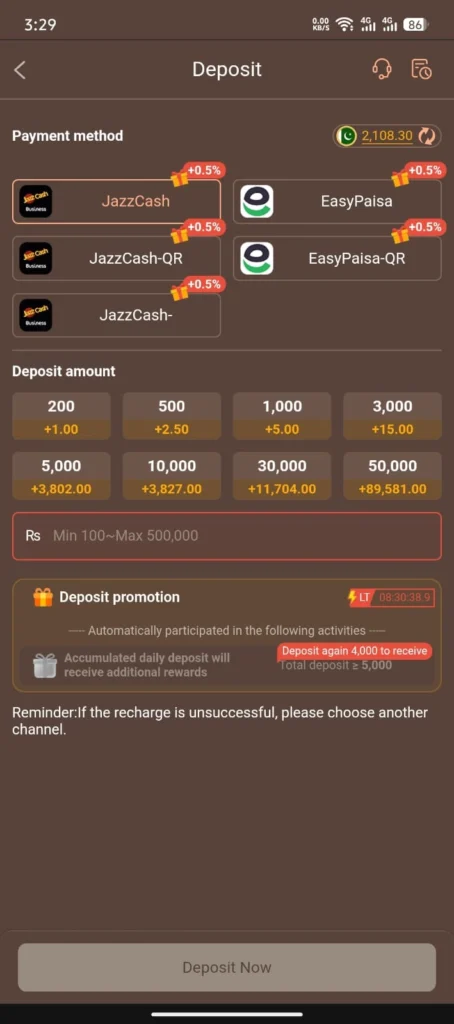
Step-by-Step Guide To Deposit Money in HC777 Game
Step 1: Open the App: Launch the HC777 Game APK on your Android device. Log in to your account, or create a new account if you are a first-time user.
Step 2: Go to the Deposit Section: From the home screen, tap the Deposit option to open the payment page.
Step 3: Choose Payment Method: Select your preferred payment option, such as EasyPaisa, JazzCash, or another available banking method.
Step 4: Enter Amount for Deposit: Type the amount you want to add to your account. The minimum deposit usually starts from 100 PKR, while the maximum limit depends on the payment option and platform rules.
Step 5: Enter Account Details: Carefully provide your payment information.
- Enter Wallet Number: Type your EasyPaisa, JazzCash, or bank account number.
- Holder Name: Enter the account holder’s name exactly as it appears in your payment account.
- Review Details: Check all the information carefully before moving to the next step.
Step 6: Confirm Request: Open your selected payment application and approve the pending payment request. After confirmation, wait for the transaction to be processed and credited to your HC777 account.
Important Tips for Smooth Deposits
- Ensure your payment account has enough balance before starting the transaction.
- Read the bonus terms carefully before claiming any promotional offer.
- Double-check your wallet number and account name to avoid payment errors.
- Keep your payment receipt until the deposit is successfully added to your account.
Conclusion
Depositing money in the HC777 Game is a straightforward process for users in Pakistan. The platform supports popular payment methods, allowing you to recharge your account in just a few simple steps. Enter the correct payment information, confirm the transaction, and wait for the deposit to appear in your account. Following these steps can help you complete your payment smoothly and avoid unnecessary delays.